Latest Version
KDE
Design
Linux
Free
org.kde.kolourpaint
Report a Problem
More About KolourPaint
The Everyday Graphic Dilemma Solved
We have all been there: you need to make a quick adjustment to an image, crop a screenshot, or draw a simple diagram, but loading a massive, complex graphics suite feels like overkill. Heavy design software takes time to load and clutters your workflow with unnecessary tools. That is where the KolourPaint paint program steps in. Developed by the trusted KDE community, this lightweight application is designed specifically for Linux users who need a fast, intuitive, and no-nonsense raster image editor to get the job done without the steep learning curve.
Key Capabilities of the KolourPaint Paint Program
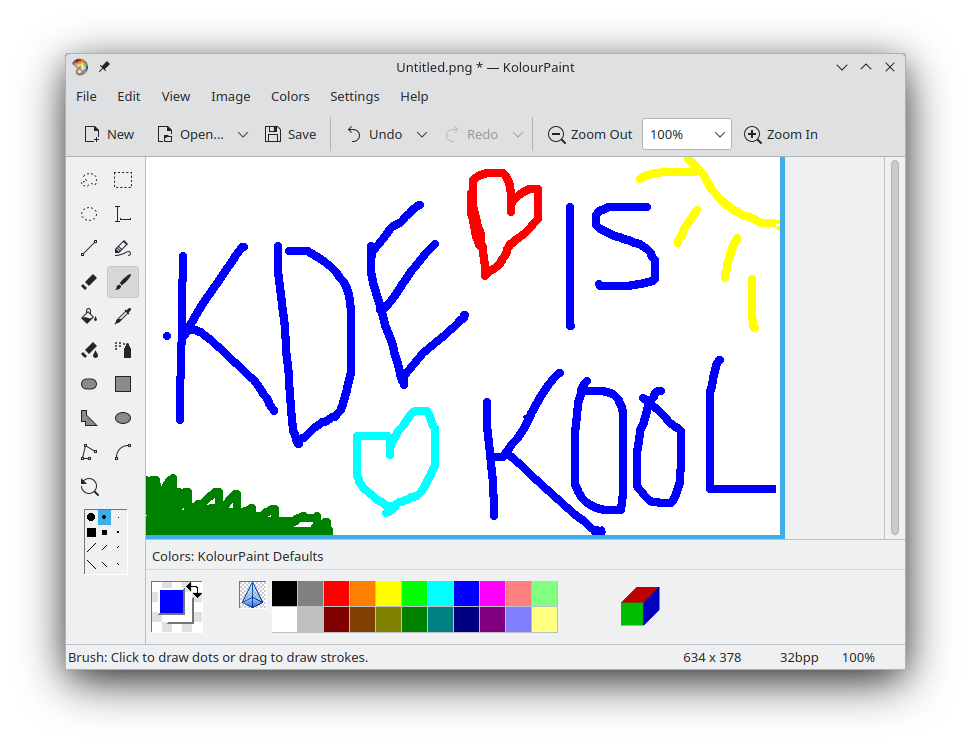
Despite its lightweight footprint, this application provides a robust toolkit for daily digital drafting and image touch-ups. It strikes a perfect balance between simplicity and utility, offering features that cover both basic drawing and essential image manipulation:
- Diverse Shape Tools: Easily draw precise lines, rectangles, rounded rectangles, ovals, and custom polygons.
- Curves and Text Integration: Add smooth curved lines and style-appropriate text annotations directly onto your canvas.
- Intuitive Color Picker: Quickly sample and match colors from any part of your active project.
- Precise Selection Options: Isolate, move, or modify specific regions of your image with flexible selection tools.
- Advanced Effects: Apply crucial adjustments such as image rotation, monochrome conversion, and other handy visual effects.
Who Is This Image Editor For?
The KolourPaint paint program is highly recommended for everyday Linux users, content creators, and office professionals who require a reliable tool for rapid touch-ups. If your work involves cropping screenshots, adding explanatory arrows to diagrams, or performing basic color adjustments, this application delivers a seamless experience. It bypasses the complexity of professional-grade design software, allowing you to focus purely on execution.
How to Access KolourPaint
If you are looking for a dependable, lightweight utility to handle your quick raster graphics tasks, this application is an excellent addition to your Linux system. To explore this tool further and add it to your desktop setup, visit the official KolourPaint page on Flathub today.
Rate the App
User Reviews






Popular Apps







Editor's Choice