
Latest Version
JannisX11
Design
Linux
Free
net.blockbench.Blockbench
Report a Problem
More About Blockbench: Professional Boxy 3D Model Editor Review
When it comes to low-poly asset creation, finding a streamlined tool that does not overwhelm you with complex CAD features can be a challenge. The Blockbench 3D model editor solves this problem by providing a highly focused, modern environment tailored specifically for boxy, low-poly aesthetics. Developed by JannisX11 for Linux and other platforms, this open-source application has become a staple for indie game developers, digital artists, and modders alike.
What You Can Accomplish with Blockbench
Unlike traditional, heavyweight digital content creation suites, this software focuses on speed and precision for cuboid geometry. It provides an intuitive, clean workspace that lets you jump straight into production without a steep learning curve. Here is a breakdown of what you can actually do with it:
1. Build Custom Low-Poly Assets
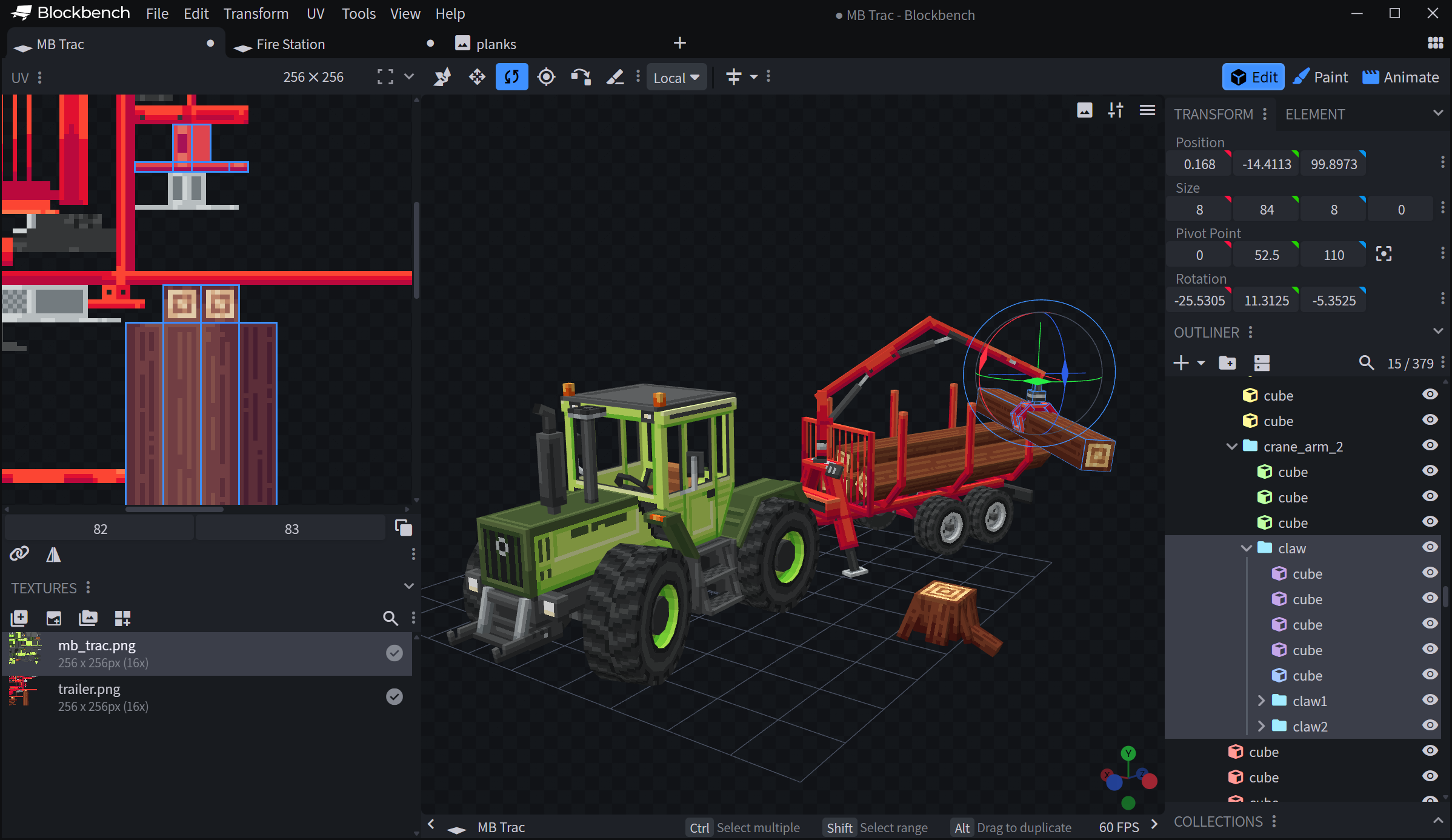
The core strength of the Blockbench 3D model editor lies in its boxy modeling philosophy. By restricting shapes to customizable blocks and planes, you can quickly draft complex structures, characters, and props. The interface features magnetic alignment, precise rotation controls, and custom grids to ensure your geometry remains clean and optimized for real-time rendering engines.
2. Paint Textures Directly on Models
There is no need to jump back and forth between your 3D view and an external 2D image editor. This design software features a built-in paint mode with dedicated tools for pixel art texturing. You can paint directly onto the 3D surfaces of your model, apply mirror painting for symmetrical designs, and generate clean UV maps automatically.
3. Optimize Assets for Game Engines
Whether you are targeting custom indie projects or established platforms, compatibility is key. Blockbench allows you to export your finished models into standardized industry formats, making it incredibly simple to import your textured assets into popular game engines, rendering pipelines, or even preparative software for 3D printing.
The Go-To Tool for Minecraft Content Creators
While the editor is highly versatile for any low-poly project, it has earned a reputation as the undisputed industry standard for the Minecraft Marketplace. It features dedicated export profiles specifically optimized for both Minecraft Java and Bedrock Editions. These formats respect game-specific constraints and support specialized features, allowing creators to seamlessly import custom entities, blocks, and vanity items directly into the game.
Extensibility and UI Customization
The application is designed to adapt to your specific workflow. Thanks to a robust built-in plugin store, users can install community-developed tools to add new features, custom export formats, or generator scripts. Coupled with its dark-themed, modern user interface, the tool stays out of your way so you can focus entirely on your creative output.
Our Verdict: Is It Right For You?
If you are looking to design ultra-realistic, high-poly sculptures, you will need to look elsewhere. However, if your goal is to master low-poly art, create retro-style game assets, or build custom content for block-based games, the Blockbench 3D model editor is an absolute must-have in your creative toolkit. It is lightweight, remarkably fast, and completely free of charge.
To try out this outstanding design tool on your Linux system, visit the official Flathub store page to get started.
Rate the App
User Reviews
Other Apps in This Category






Popular Apps









Editor's Choice